Ad Diagnosis

Amazon Sponsored Products diagnostics.

Diagnose Amazon SP campaigns across campaigns, keywords, and search terms. Luckee turns ACOS, wasted spend, ROAS, orders, search-term quality, and keyword harvesting opportunities into ready-to-act Markdown reports.
Diagnosis running
Luckee Ad Diagnosis summary

Diagnose every layer.

Campaign, keyword, and search-term agents run in parallel so teams can see where spend is working and where it is leaking.

Convert findings to action.

Each row is labeled with keep, optimize, observe, pause, harvest, or negative-list recommendations.

Deliver reports teams can use.

Four Markdown reports plus JSON summaries drop into Notion, Linear, Slack, or your execution workbench.

Where PPC teams get stuck

Amazon Ads Console shows numbers. It does not explain the next move.

Luckee Ad Diagnosis is built for operators who need a ranked, defensible action brief.

01

ACOS spikes are hard to isolate

The leak may come from one campaign, several keywords, or a wave of poor search terms.

02

Search-term cleanup is manual

Building a negative list with evidence takes hours across Auto and broad-match campaigns.

03

Winners stay buried

Auto-discovered terms with strong ROAS often never get promoted into exact-match structure.

04

Reports do not travel

Native dashboards are hard to paste into weekly reviews, client updates, or approval queues.

Core capabilities

Eight automated phases, one diagnosis.

Based on the reference Ad Diagnosis page: macro health, campaign triage, keyword classification, search-term actions, and generated reports.
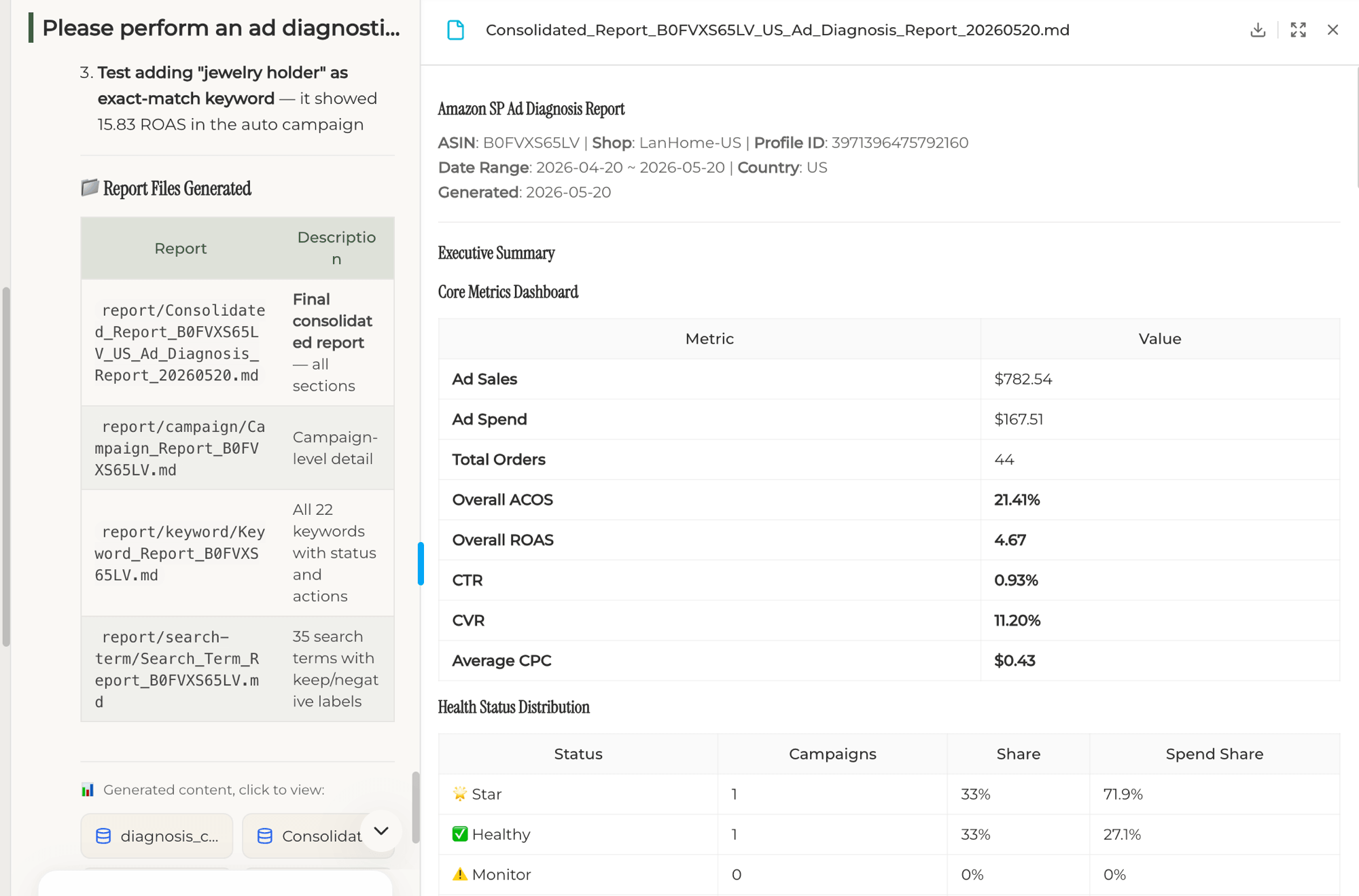
Macro diagnosis

Store-level PPC health in one executive view.

  • Core metrics dashboardACOS, ROAS, ad sales, orders, spend, conversion, and health distribution in one consolidated report.
  • Health status tiersClassify campaigns into Star, Healthy, Problematic, and observation states based on thresholds.
  • Spend share by tierSee whether budget is flowing toward winners or being consumed by problematic campaigns.
Ad Diagnosis consolidated report
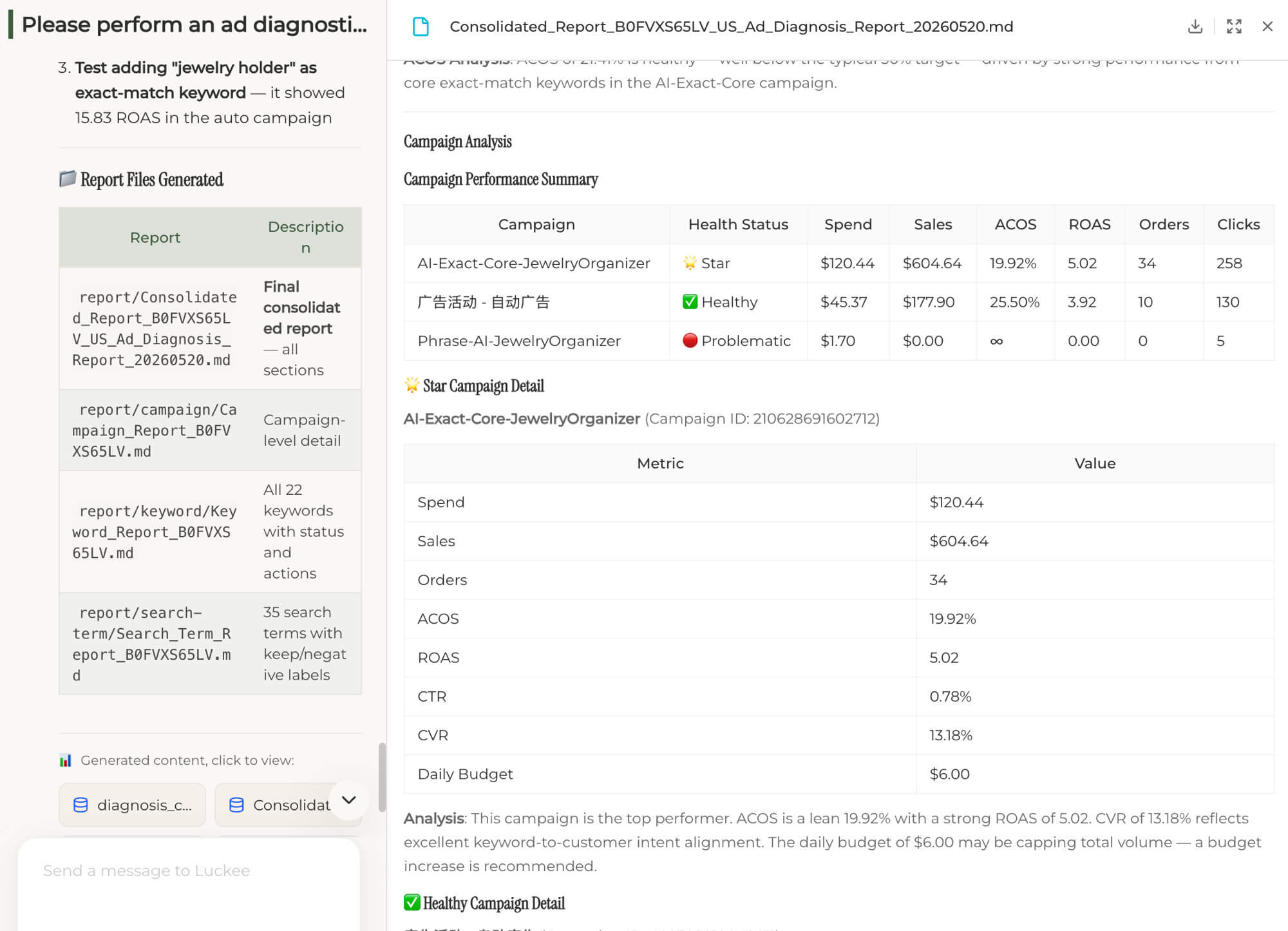
Campaign diagnosis

Find which campaigns deserve scale, repair, or pause.

  • Per-campaign performanceSpend, sales, ACOS, ROAS, orders, CTR, CVR, budget, and diagnosis status.
  • Action labelsScale Star campaigns, monitor Healthy campaigns, and pause or repair Problematic campaigns.
  • Budget movementIdentify budget-capped winners and campaigns consuming budget without enough return.
Ad Diagnosis campaign analysis report
Keyword diagnosis

Label every keyword with what should happen next.

  • Keep / Optimize / Observe / PauseClassify each keyword with evidence, not spreadsheet guesswork.
  • Match-type breakdownSee whether exact, phrase, and broad structures are carrying the right work.
  • Per-row recommended actionEach keyword gets a practical instruction for review or execution.
Ad Diagnosis keyword report
Search-term diagnosis

Harvest winners and draft negative lists.

  • Search-term labelsKeep, optimize, observe, or negative based on spend, orders, ACOS, and ROAS.
  • Auto to exact migrationPromote auto-discovered winners into tighter keyword control with ROAS evidence.
  • Negative list draftsReady-to-copy negative terms with the rationale attached.
Ad Diagnosis search term report
Multi-format reports

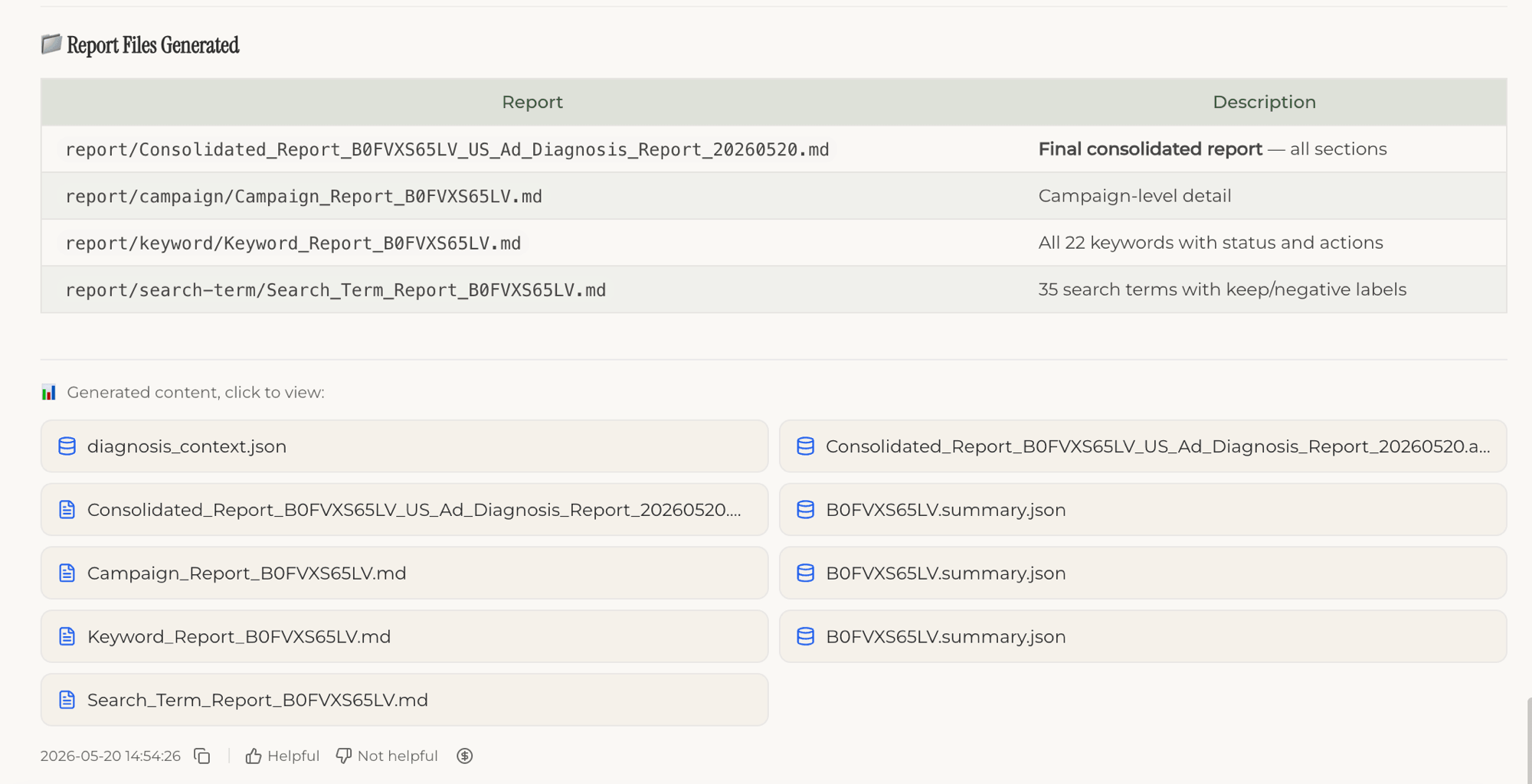
Four Markdown reports plus JSON summaries.

  • Consolidated reportExecutive summary, KPI dashboard, campaign analysis, keyword highlights, search-term highlights, and next steps.
  • Three detail reportsCampaign, Keyword, and Search Term reports for execution teams.
  • JSON summariesMachine-readable outputs for dashboards, scripts, or downstream workflows.
Ad Diagnosis generated report files

How it works

Eight automated phases, one operator-ready diagnosis.

Parameter collection

Normalize store, ASIN, country, and date range.

Resolve profile

Find the Sponsored Products advertising profile.

Resolve portfolio

Narrow scope when portfolio filtering is needed.

Fetch ad data

Pull campaign, keyword, and search-term metrics.

3D diagnosis

Campaign, keyword, and search-term agents run in parallel.

Generate report

Markdown generator stitches findings into an executive view.

Validate output

Consistency checks confirm the logic before delivery.

Deliver files

Four .md reports plus JSON summaries are ready to act on.

Live example

See it on a real store.

LanHome jewelry organizer in the US marketplace. Luckee scanned 3 campaigns, 22 keywords, and 35 search terms, then flagged what to scale, optimize, pause, and harvest.

LanHome Ad Diagnosis

Jewelry Organizer · US Marketplace · 3 campaigns · 22 keywords · 35 search terms

B0FVXS65LV
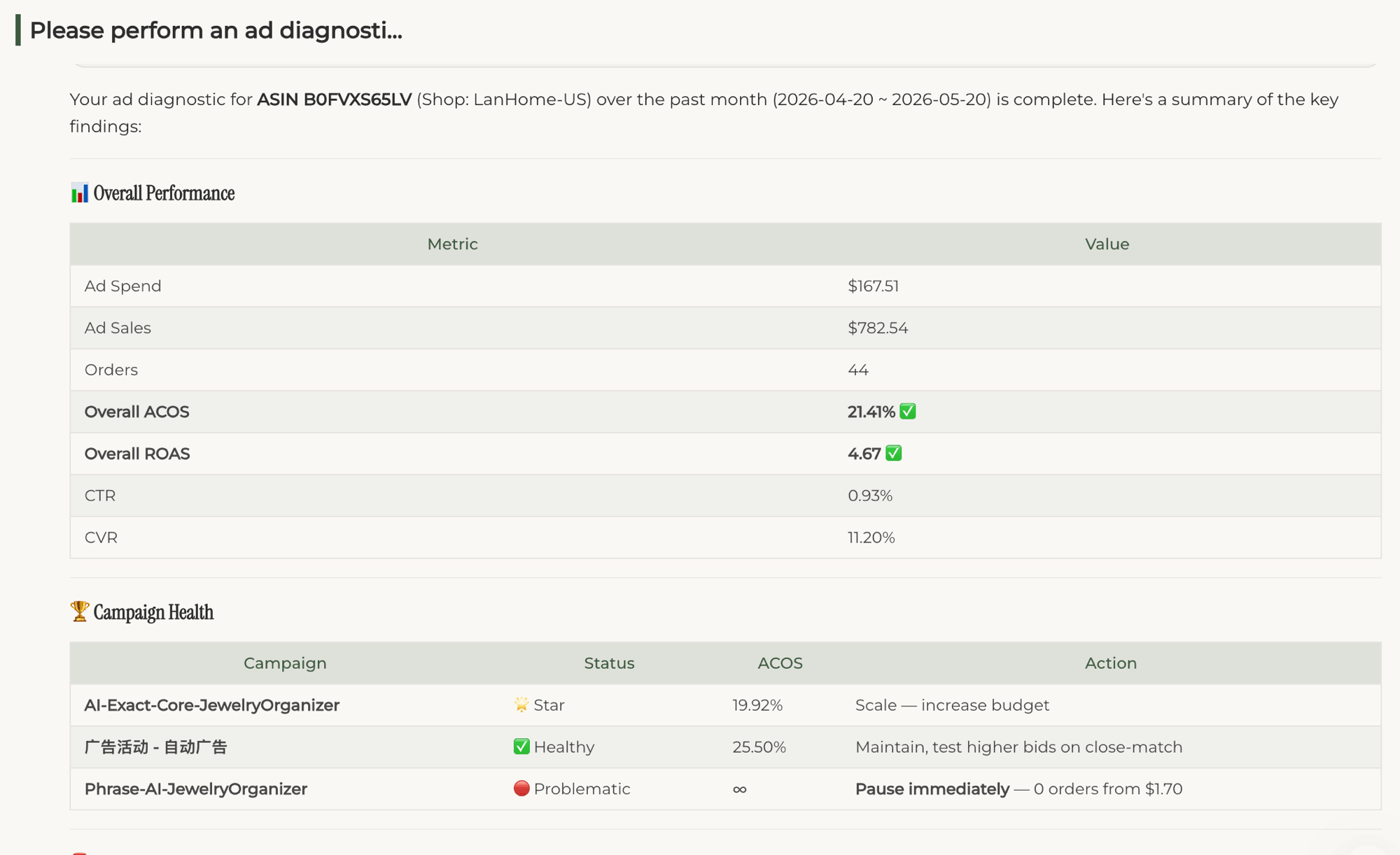
21.41%Overall ACOS
4.67Overall ROAS
$782Ad sales
44Orders
Consolidated ad report
Consolidated report Core KPIs, health status distribution, and spend share by tier.
Campaign performance report
Campaign performance Per-campaign performance with status, ACOS, ROAS, orders, and action labels.
Consolidated_Report_B0FVXS65LV.md

Executive view with KPI dashboard, campaign analysis, keyword highlights, search-term highlights, and next steps.

Final report · Markdown
Campaign_Report_B0FVXS65LV.md

Per-campaign detail with spend, sales, ACOS, ROAS, CTR, CVR, budget, status, and action.

Campaign detail · Markdown
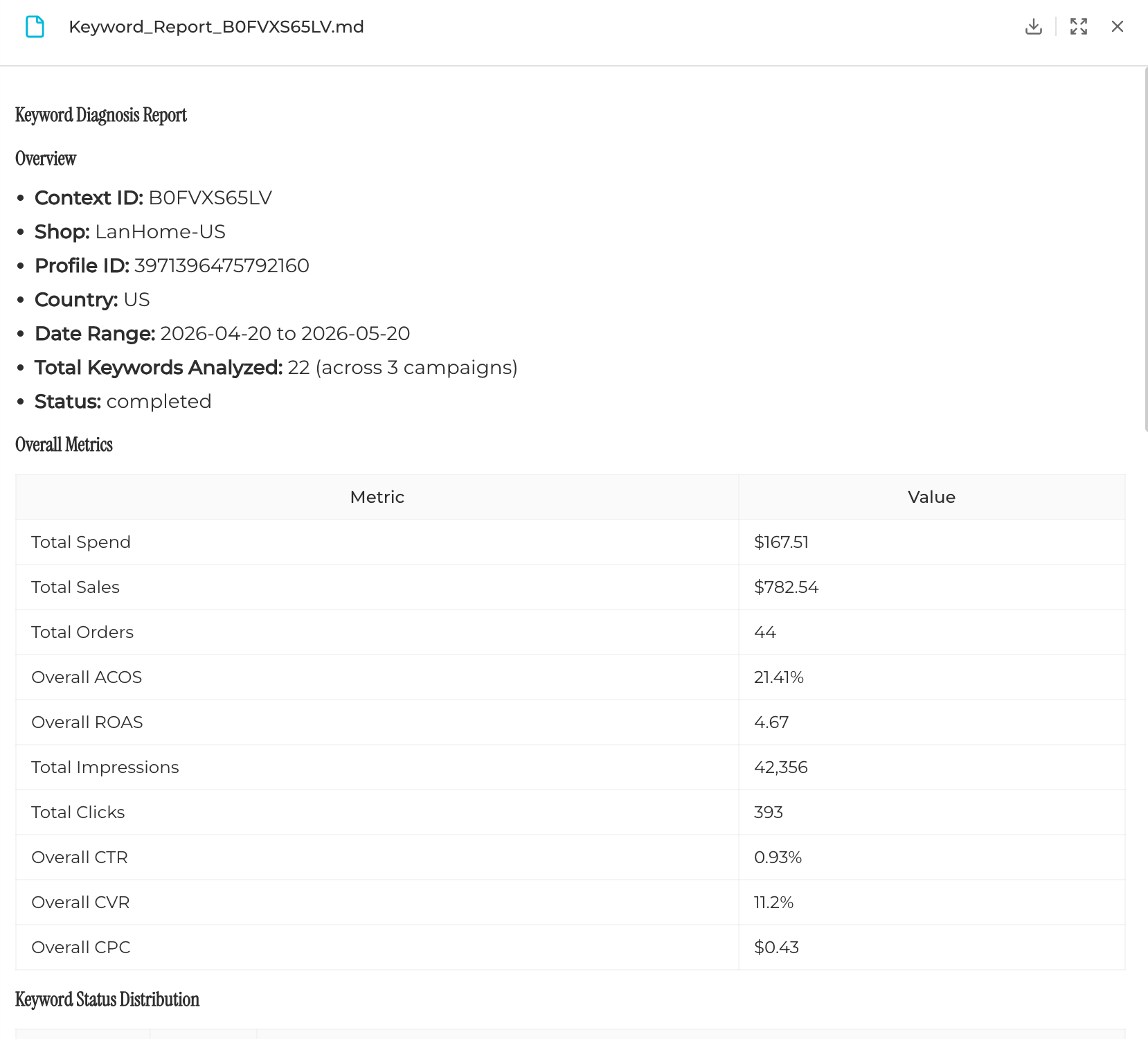
Keyword_Report_B0FVXS65LV.md

All keywords with keep, optimize, observe, or pause labels.

Keyword detail · Markdown
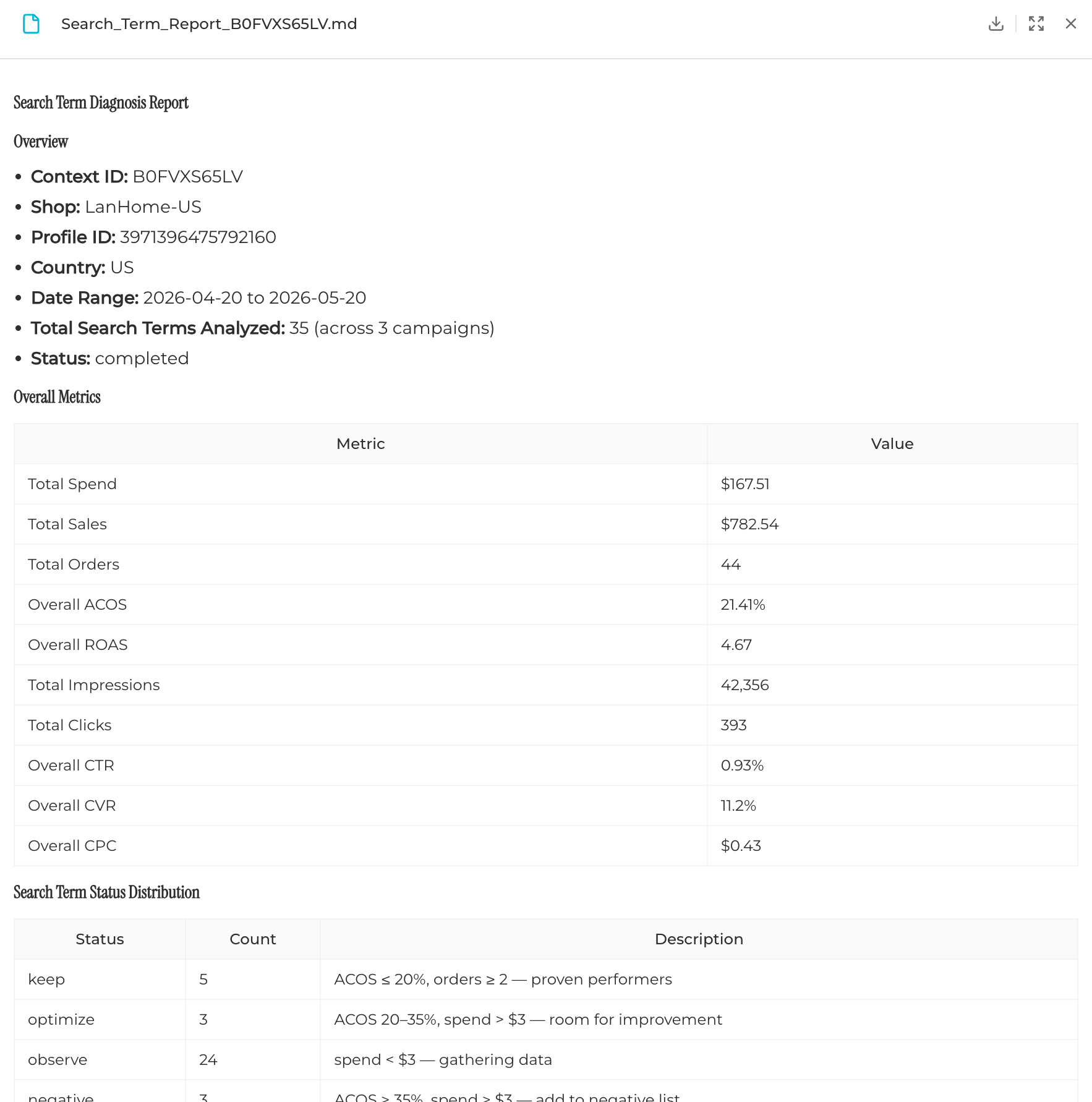
Search_Term_Report_B0FVXS65LV.md

Customer search terms with harvest, optimize, observe, and negative-list recommendations.

Search-term detail · Markdown

Use cases

Where teams put Ad Diagnosis to work.

01

Monthly store health check

Stack consolidated reports into a portfolio view for leadership or client updates.

02

High-ACOS firefight

Find whether the leak is a campaign, keyword, search term, or budget allocation issue.

03

Auto-to-exact migration

Identify auto-discovered terms that deserve dedicated exact-match keywords.

04

Negative-list build

Generate defensible negative keyword drafts with spend and ACOS evidence.

05

Budget reallocation

Move budget from Problematic campaigns toward Star campaigns that are capped.

06

Weekly review automation

Drop Markdown-native reports into Notion, Linear, Slack, or agency review workflows.

Comparison

Why this is not just the Amazon Ads Console.

Ads ConsoleManual spreadsheetSeller toolsLuckee Ad Diagnosis
Macro viewPer-campaign onlyPossible, manualDashboard view3-tier health classification
Keyword labelsNoneManual rulesTracker onlyKeep / Optimize / Observe / Pause
Search-term labelingNoneManualPartialKeep / Optimize / Observe / Negative
Negative draftsNoneManualManualReady-to-copy with rationale
OutputWeb UI onlySpreadsheetWeb UI + CSVMarkdown + JSON

Common questions

Before you try it.

How often should I run a diagnosis?

Weekly for actively managed ASINs and monthly for stable SKUs. Short windows move faster but carry more noise.

Can I diagnose multiple ASINs?

Yes. Run per ASIN, then aggregate JSON summaries into a portfolio-level view.

Does it work for Auto campaigns?

Yes. Auto campaigns get search-term analysis and auto-to-exact migration suggestions when terms show strong ROAS.

Can thresholds be customized?

Yes. Health classification can adapt to category, margin profile, ACOS target, and growth stage.

Stop guessing. Diagnose your ads.

Run Ad Diagnosis on one ASIN and turn Amazon Sponsored Products data into reviewable actions.

Move to execution